Why Multifactor Authentication Matters More Than You Think
We have spent enough Monday mornings in veterinary hospitals to know that real trouble is usually quiet.
No skulls and crossbones on reception monitors. No sirens. No dramatic warning that something has gone wrong.
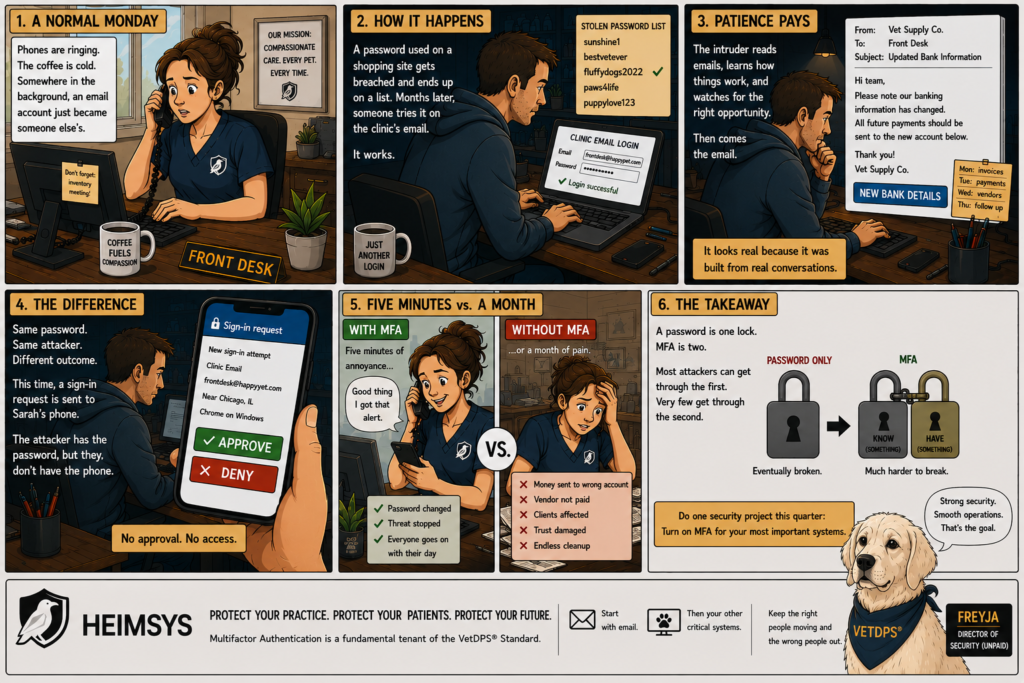
Usually it’s just a front desk that looks normal, a coffee going cold, and somewhere in the building a business email account that now belongs to someone who doesn’t work for you.
Here’s how it tends to happen
Someone on staff has a password they like, and they use it everywhere. The scrubs shop. A veterinary management forum. An online retailer. Their work email. One of those sites gets breached, the way websites do, and that password eventually ends up on a list that gets traded, sold, and tried against thousands of accounts.
Months later, on an otherwise unremarkable evening, someone tries that password against the clinic’s email system.
And it works.
Nothing lights up because, as far as the system can tell, the correct password was entered. The person signing in must be the person who owns the account.
The intruder doesn’t do anything dramatic. They don’t send threatening messages or lock up computers. Instead, they do what most successful attackers do: they wait patiently.
They create rules that quietly forward messages. They read conversations. They learn which distributors the clinic works with, how invoices are worded, who approves payments, and which employees tend to ask questions before money gets sent.
A few weeks later an email arrives explaining that a vendor has changed banks and future payments should be sent to a new account. The message looks legitimate because it was built using information taken directly from the clinic’s own mailbox. The names are familiar. The timing makes sense. The wording matches previous conversations.
By the time anyone realizes something is wrong, the money is gone.
Now imagine a different clinic across town.
Same week. Same leaked password. Same attacker.
This time the password works, but the login doesn’t.
Instead of immediately opening the mailbox, the system sends a sign-in request to the office manager’s phone and waits for approval. The attacker has the password, but they don’t have the device sitting in her purse in the break room.
The request expires.
The login fails.
The next morning, she notices the alert, changes her password over coffee, and gets on with her day. What could have turned into months of headaches becomes a thirty-second inconvenience.
The interesting thing about those two stories is that the password wasn’t really the deciding factor. In both cases the attacker already had it. What changed the outcome was the clinic’s willingness to ask for one more piece of proof before opening the door.
That’s all multifactor authentication really is.
Security professionals often describe MFA as requiring two forms of verification. The password proves that you know something, while the approval request on your phone proves that you possess something. The system only grants access when both pieces line up, which is why a stolen password by itself is usually no longer enough.
The reason this works so well is that passwords travel in ways most people never think about. They get reused across websites, captured in data breaches, entered into convincing phishing pages, and occasionally shared when they shouldn’t be. Once a password escapes into the world, it can end up almost anywhere. A phone, on the other hand, tends to remain in the possession of the person who owns the account, which means an attacker can know the password and still be unable to get through the second check.
You’re probably thinking the same thing we hear from practice managers all the time: the front desk is already busy enough without adding another step to the login process.
That’s a fair concern.
MFA does add a few seconds to the sign-in process, and we’re not going to pretend otherwise. The question is whether those few seconds are worth avoiding the alternative. In our experience, the alternative usually involves investigating suspicious payments, recovering accounts, rebuilding trust with vendors, and spending days figuring out what was accessed while nobody realized an intruder was sitting in the mailbox.
We’ve worked with clinics on both sides of that equation, and we’ve never heard anyone say they regretted turning on MFA.
The key is implementing it correctly. Staff shouldn’t be challenged every few minutes on devices they use every day. Approval requests should be simple. Replacing a phone shouldn’t turn into a crisis. Like most technology, the goal is for it to fade into the background and quietly do its job.
If you’re wondering where to start
Start With Email.
A compromised mailbox is often the launch point for payment fraud, account takeovers, password resets, and many of the most expensive incidents veterinary practices experience. After email, focus on your cloud applications, payment platforms, remote access tools, and any other systems that can significantly impact operations if compromised.
That short list covers the systems that matter most, and it’s why multifactor authentication is a fundamental tenet of the VetDPS® standard. The standard doesn’t care which application provides MFA or what brand name appears on the login screen. It simply requires that the people accessing critical systems prove they are who they claim to be.
At its core, MFA is not a complicated technology. It’s simply an acknowledgment that passwords fail quietly and more often than most people realize. A password by itself is a single barrier, and eventually barriers fail. MFA adds a second one, which is why a stolen password stops being the beginning of a disaster and becomes nothing more than a failed login attempt.
If you do one security project this quarter, make it this one. Few controls provide more protection for less effort, and few are better at turning what could have been a very bad month into a mildly annoying morning.
If you need help implementing it, feel free to give us a call. We’re always here to help.